
How LibreOffice and Markdown Can Become The Future of AI Productivity
AI assisted article

The tech world is currently obsessed with “AI-first” everything. But while big-name office suites are busy tacking on chat interfaces that hallucinate in the margins, the open-source world just quietly dropped a release that actually understands the assignment.
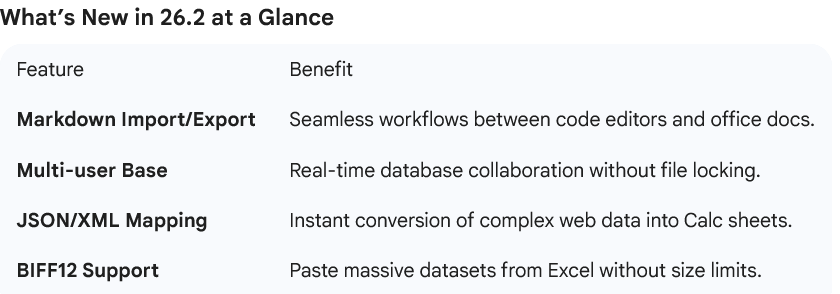
LibreOffice 26.2 has officially arrived, and with it, the “unsexy” but game-changing headline feature: Native Markdown Support.
It might seem like a small detail for a suite that’s been around for decades, but in the age of Generative AI, this isn’t just a new file format—it’s a paradigm shift. Here is why LibreOffice should go even further and make Markdown, HTML, and JavaScript the bedrock of modern productivity.
Markdown: The Language of Machines and Humans
For years, the .docx format has been the king of the office. But for AI, .docx is a nightmare—a bloated container of XML and proprietary styles that creates “noise” for Large Language Models (LLMs).
Markdown, on the other hand, is pure signal. By embracing Markdown, LibreOffice is building a bridge to the future:
AI-Friendly Parsing: LLMs like Gemini and GPT process Markdown far more accurately than rich text. It preserves structural hierarchy (headings, lists, tables) without the overhead of hidden formatting code.
Consistency: With the new LibreOffice 26.2 update, you can now import Markdown via the clipboard and even apply ODT/DOCX templates to it instantly.
The New Standard: We shouldn’t just “support” Markdown; we should make it the word processing standard. Imagine a world where your “Writer” document is a simple
.mdfile that looks beautiful in a professional editor but is instantly readable by an AI agent for summarization or data extraction.
Calc & Impress: Why JSON, HTML, and JS are the New “Macro”
The release notes for 26.2 highlight a major win for data nerds: JSON and XML mapping in Calc. This allows users to open a nested JSON file and have LibreOffice automatically flatten it into a 2D spreadsheet.
But why stop there? If we want a suite that truly adapts to the “AI age,” we need to rethink how we build presentations and spreadsheets.
1. Presentations as Live Web Content
Currently, presentations (Impress) are static slides. But AI is incredibly good at writing HTML and CSS. If LibreOffice adopted a web-standard approach for slides, an AI could “code” a dynamic, interactive presentation in seconds. No more “fighting the layout”—just clean, responsive code rendered as a beautiful deck.
2. JavaScript: The Powerhouse for Data
The legacy BASIC IDE in LibreOffice got an autocomplete boost this release, but let’s be real: the world runs on JavaScript. By making HTML/JS the standard for spreadsheets, we unlock:
Real-time Data Tables: AI can generate a JavaScript-driven table that fetches live data, rather than a static cell grid.
Interactivity: Imagine a “spreadsheet” that behaves like a web app, where the AI can write a custom script to visualize your data in D3.js or Chart.js directly inside your document.
Reliable Isn’t Boring—It’s Essential
The Document Foundation’s executive director, Florian Effenberger, put it best: “LibreOffice 26.2 shows what happens when software is built around users, not business models.”
While others chase the hype of “AI agents” that try to write your emails for you, LibreOffice is focusing on the infrastructure that makes AI actually work: interoperability, performance, and open standards.
By perfecting Markdown import/export and opening the door to JSON mapping, LibreOffice is quietly becoming the most powerful tool in the AI developer’s—and the modern worker’s—arsenal.
The future of the “Office Suite” is a suite that speaks the same language as the tools we use to build the future. LibreOffice 26.2 is a massive step in that direction.